“How Motion Design Enhances User Experience in Mobile Apps”
How Motion Design Enhances User Experience in Mobile Apps
In the fast-paced world of mobile app development, creating a seamless and engaging user experience (UX) is crucial for the success of any application. With millions of apps vying for user attention, developers and designers must leverage every tool at their disposal to stand out. One such tool is motion design, which has emerged as a powerful technique to enhance UX in mobile apps. This blog post delves into the ways motion design contributes to a superior user experience, exploring its benefits, applications, and how it can transform a static interface into a dynamic, user-friendly environment.
Understanding Motion Design
Motion design, also known as motion graphics, involves the use of animation and visual effects to communicate ideas and provide feedback to users. It integrates elements such as transitions, animations, and transformations to create a fluid and interactive interface. This design approach is not only about aesthetics; it plays a pivotal role in guiding users, simplifying navigation, and making interactions more intuitive.
The Importance of Motion Design in Mobile Apps

With the increasing capabilities of smartphones and tablets, users now expect more than just static images and text. They crave immersive and responsive experiences that make interactions feel natural and engaging. Motion design addresses this need by:
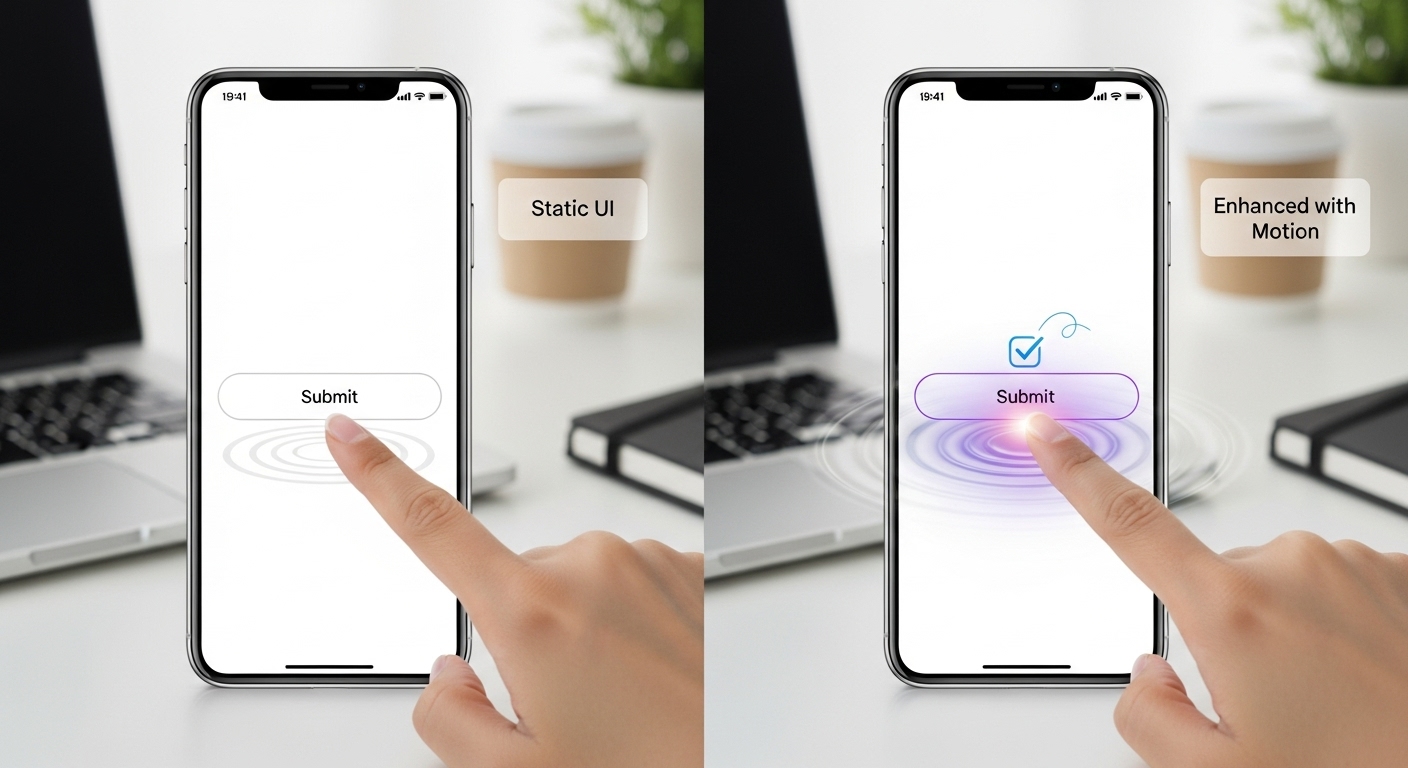
- Providing Visual Feedback: Motion can offer instant feedback, helping users understand the consequences of their actions. For instance, a button that changes color and expands slightly when tapped indicates a successful interaction.
- Enhancing Navigation: Smooth transitions between screens and elements make navigation intuitive, reducing cognitive load and improving user satisfaction.
- Guiding User Attention: Animations can direct users to important features or new content, ensuring they do not miss crucial information.
- Improving Learnability: By visually demonstrating how to use an app, motion design can reduce the learning curve for new users.
Applications of Motion Design in Mobile Apps
Effective motion design can be applied in various aspects of mobile app development. Below are some key areas where it plays a significant role:
Loading Animations
Loading screens are often inevitable in mobile apps. However, they provide an excellent opportunity to engage users with creative animations. By transforming a potential point of friction into an enjoyable experience, motion design keeps users entertained and informed about the loading process.
Microinteractions
Microinteractions are small, subtle animations that occur in response to a user’s action, such as a swipe or tap. These interactions can significantly enhance the user experience by providing real-time feedback and making the app feel more responsive and alive.
Transitions and Navigation
Motion design helps create seamless transitions between different screens and sections of an app. By using animations to slide, fade, or transform elements, users can move through the app effortlessly, maintaining their focus and understanding of the app’s structure.

Onboarding and Tutorials
When new users download an app, the onboarding process is critical to their first impression. Motion design can turn a potentially overwhelming experience into an engaging journey, guiding users through key features using animated tutorials and step-by-step instructions.
Best Practices for Implementing Motion Design
While motion design offers numerous benefits, it must be implemented judiciously to avoid overwhelming users or negatively impacting performance. Here are some best practices for integrating motion design into mobile apps:
- Keep It Simple: Overly complex animations can confuse users. Aim for simplicity and clarity to ensure that animations enhance rather than detract from the user experience.
- Ensure Consistency: Consistent use of motion design elements across the app helps users predict interactions and feel more comfortable using the app.
- Optimize for Performance: Poorly optimized animations can lead to lag and a sluggish experience. Ensure that animations are smooth and do not hinder the app’s performance.
- Test with Real Users: Conduct user testing to gather feedback on the effectiveness of motion design elements. This ensures that the animations meet users’ needs and enhance their experience.
Challenges and Considerations
While motion design offers numerous advantages, there are challenges and considerations to keep in mind during implementation. Developers must balance creativity with practicality, ensuring that animations complement the overall user experience without causing distractions or performance issues.
Additionally, accessibility is a critical consideration. Designers should ensure that motion design does not hinder users with motion sensitivity or impairments. Providing options to reduce or disable animations can help make apps more inclusive.
Furthermore, cultural differences may affect how animations are perceived. It’s important to tailor motion design elements to suit the target audience, taking into account cultural norms and preferences.
Takeaways
Motion design is a powerful tool that can significantly enhance the user experience in mobile apps. By providing visual feedback, guiding user attention, and simplifying navigation, motion design creates a more intuitive and engaging interface. When implemented thoughtfully and strategically, it can transform an ordinary app into an extraordinary one, fostering user satisfaction and loyalty.
Incorporating motion design into mobile apps is no longer a luxury but a necessity in today’s competitive app market. As developers and designers continue to explore innovative ways to captivate users, motion design will undoubtedly remain at the forefront of creating memorable digital experiences. By understanding its potential and applying best practices, app creators can harness the full power of motion design to deliver exceptional user experiences.
Real-World Examples of Motion Design in Mobile Apps
To understand the practical application of motion design, let’s explore some real-world examples where it has significantly enhanced user experience:
Instagram Stories
Instagram has effectively utilized motion design to make its Stories feature one of the most engaging aspects of the app. The smooth transitions between stories, along with subtle animations when users add stickers or text, create an enjoyable and seamless user experience. This encourages users to spend more time on the platform and interact with content creatively.
Tinder Swipe
Tinder’s iconic swipe feature is a prime example of microinteractions powered by motion design. The swiping animation is both intuitive and satisfying, providing instant feedback to users. This simple yet effective use of motion design has been a key factor in Tinder’s widespread popularity and user retention.
Google Material Design
Google’s Material Design guidelines emphasize the use of motion to create a natural and responsive interface. Apps that follow these guidelines often feature subtle animations that enhance clarity and provide context. For instance, when a button is tapped, it reacts in a way that suggests depth and motion, reinforcing user actions.
Shopify’s Mobile App
The Shopify mobile app incorporates motion design to streamline the e-commerce experience. From animated checkout processes to product detail transitions, the app uses motion to guide users through the purchasing journey with ease. This not only improves user satisfaction but also boosts conversion rates.
Future Trends in Motion Design for Mobile Apps
As technology evolves, so do the possibilities for motion design in mobile apps. Here are some emerging trends that are set to shape the future of motion design:
3D Animations
With advancements in processing power and graphic capabilities, 3D animations are becoming more feasible in mobile apps. These animations can create a richer and more immersive user experience, allowing for more expressive and engaging interactions.
Augmented Reality (AR) and Virtual Reality (VR)
AR and VR technologies are opening new avenues for motion design. By integrating these technologies, mobile apps can offer users an entirely new dimension of interaction, blending the digital and physical worlds seamlessly. This creates opportunities for innovative storytelling and user engagement.
Personalized Animations
As data-driven personalization becomes more prevalent, motion design can be tailored to individual user preferences. By analyzing user behavior and preferences, apps can deliver personalized animations that enhance user engagement and satisfaction.
Conclusion: Harnessing the Power of Motion Design
In conclusion, motion design is an indispensable component of modern mobile app development. Its ability to enhance user experience, streamline interactions, and guide users through apps is unparalleled. By understanding the principles and best practices of motion design, developers and designers can create apps that not only meet user expectations but exceed them.
The future of motion design is promising, with emerging technologies and trends continually expanding the possibilities. By staying informed and adaptive, app creators can leverage motion design to craft compelling and memorable user experiences, ensuring their apps remain competitive in an ever-evolving digital landscape.
In the quest to create the ultimate user experience, motion design stands as a beacon of creativity and innovation. Its potential to transform mobile apps into dynamic and engaging tools is immense, and as the technology continues to advance, its impact on user experience will only grow more profound.